Development Process of Computer-Based Training (CBT)
**
What are the details required to make CBT**
Before starting CBT, OEM must finalize the duration of CBT. In some military RFP/SCOPE duration of CBT is mentioned along with the duration of each topic, subtopic, and sub–sub-topic.
If that is not mentioned then OEM has to make a Table of content first and mention the approximate time to cover each topic, subtopic, and sub–sub-topic.
It is called CCID, or course content Identified document. It is basically a full detailed Table of content and duration.
Once the CCID document is ready then, the Vendor will collect raw content and make a DCID document.
Which means a Detailed Course content document. It can also be called a storyboard. This storyboard will have complete content for every topic, subtopic, and sub–sub-topic.
Also, this document will contain the presentation methodology. It means is this particular sub-topic is being covered as Video, or Image, Text or animation if animation, 2d or 3d, etc.
Based on the number of words we can arrive at a number of hours.
If the number of hours is more than deliverable, we can concisely edit or delete unwanted text.
Once the DCDD is approved by end-user/ Army then we can start production of CBT.
Content Development Approach
Step -1 Shell/ Prototype/Template Design
The first step in the creation of the CBT is to design the functional prototype, branding, skinning i.e., the template of the course. This will be developed based on inputs like target audience, their skill/education level, nature of topics, other navigation facilities like
play and Pause
Forward, Rewind
Audio mute, Audio control
Seek bar
Book mark
Glossary
Audio Transcription script
Gallery
Summary
Reference
Help
and prototype/ functional shell will be sent to the client for review and approval.
Step -2 Development of Design Documents
Based on the inputs provided by Subject Matter Experts (SME), a team of Instructional Designers will prepare a Table of Content / Course content identification Document and Storyboard/ Script/ Detailed Content Design Document consisting of the text that will appear on the screen. The corresponding text for voice-over, graphic design instruction will also be provided. Instructional Designers will interact closely with the SME and obtain the inputs, grasp the concepts, reproduce them as content, and finally get it reviewed by the SME/ Client.
The storyboard will be checked for technical, typographical, and grammatical errors. Checks will also be done to ensure that the content matches the requirements specified by the client. Errors found will be rectified and the final content will be sent to the client for approval and sign-off.
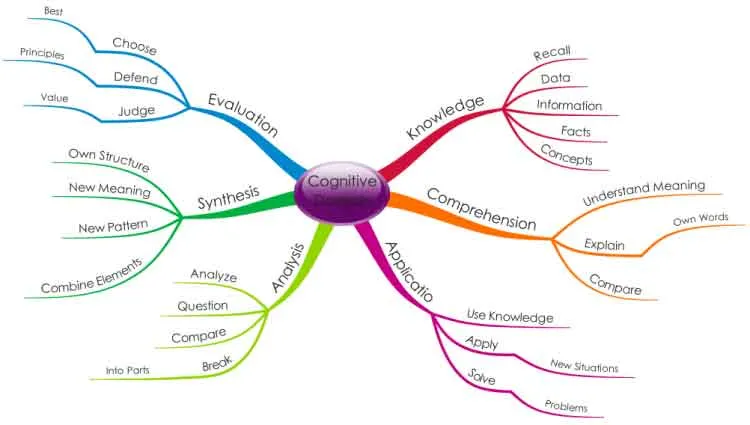
Our instructional designers develop design documents as per the guidelines of principles of adult learning, Instructional Design Taxonomies such as Bloom's Cognitive Taxonomy, Dick and Carey Model, Kemp's Instructional Design Model, Gagné's 9 Events of Instruction, Kirkpatrick's 4 Levels of Training Evaluation
Step -3 Approval of Design Documents
The client will review the Design Document, and pass back the reviewed document with Comments, suggestions if any
Step -4 Content/ Media/ Assets/ Development and Authoring
After the necessary Corrective Actions are implemented, the multimedia team will put together the approved template and the contents to create the complete version of the e-Learning course. Based on the storyboard, graphics and animations will be included at the appropriate locations to enhance the learner’s understanding of the points being discussed. Voice-over will be recorded as necessary, and the graphics and animations created will be synchronized with the text.
This developed version will pass through a series of stringent quality checks sent to the client for review and approval. This version is called Alpha Version
Sep -5 Beta Version
The client will review the Alpha version and pass back the reviewed content with comments, suggestions, etc. for corrections if any. Once these corrections are fixed by the Development team then once again the corrected Final version will be submitted to the client along with relevant approval documents
Step -6 Gold version
Gold version DVD contains the following multimedia elements
Approved/ Final Table of Content
Approved/ Final Design Document (Script, Story Board, Detailed Design Document)
•Alpha Version
Beta Version
CD Version
Raw contents (images, PDF, DOC, PPT, other files collected from client)
User Manuals, Test Documents, Graphic Charter
Quality Assurance Document
and prototype/ functional shell will be sent to the client for review and approval.
Code and Pixels Content Development Life Cycle (CDLC)
Putting the Code and Pixels Content Development Life Cycle (CDLC) in a simple way:
Our Project life cycle comprises 3 Phases i.e. Pre-project Analysis, Project Production, Post Project support.
Phase – 1 Pre Project Analysis
Requirement Analysis
Proposals & Quotation
Approval
Phase – 2 Project Production
1) Pre Production:
Detailed client requirement analysis, Collection of raw material, Project Planning
Table of Content/Course Specific Document/Course content Identification Document
Script/Story Board/ Visual Story Board/Detailed Content Design Document
Quality Check
2) Production:
Videography, Photography, Voice Recording
Development of Graphic Assets, Animations, Programming, Integration, Internal QC
3) Post Production:
Quality Check and Delivery of Alpha/Beta/Gold Versions
Media Generation / Content Deployment / Delivery
Training to users/ facilitators
Phase 3 – Post Project Support
In addition to providing superior E-content, we provide Post Project Support to the client. We conduct feedback analysis sessions from different actual users and collect user feedback on the project/ content so that we can augment the content next time. The best way to improve the usability of the content is to address the critics of the content.
LEVELS OF CBT
Level 1. Passive-no interaction
This level is what is commonly referred to as ‘page-turners'. The course is linear and could be considered basic training, in which the student acts only as an information receiver.
Basically, the sequence of screens is fixed and the student can not choose the order in which you want to see the content, return to a previous topic or browse freely. However, it can be effective for communicating simple concepts
At this level learners do not interact with resources, they just have:
Graphics, images
Rollovers
Basic quiz questions
Some refer to level 1 e-learning as the “click next” style of e-learning. It has very low amounts of interactivity (i.e., clicking the Next button is as interactive as it typically gets) and there is a lot of static text and images.
Level 1 quizzes are usually basic multiple-choice and true-or-false questions. Level 1 e-learning, while basic, does have its place: it can be a quick and inexpensive way to cover simple rules or procedures.
These types of courses or CBTs are used for classroom teaching
No Or very minimal Voice over is used
Power point-based course development
Level 2. Limited interaction
In this case, the course continues to be basic, but the student has more control over their training; they can do more than just watch, read and navigate. This level is used for non-complex operations and maintenance lessons.
At level 2, e-learning courses start to have multimedia. Courses at this level typically contain some audio and video, as well as some basic animations and transitions. This level of content is also often accompanied by narration and activities such as “click and reveal” interactions.
Typical level 2 quizzes are drag-and-drops and matching activities.
Level 2 e-learning is often used because it’s a nice middle ground that offers a richer experience for the learner
At this level, learners interact with resources such as:
Clickable animated graphics
Navigation expands to menus, glossaries, and links to external resources.
Often includes simple exercises (i.e. drag-and-drop, matching, and identification components). Audio and video.
This level is best for courses that are intended to support on-the-job-performance or when importance is more on the skill development
(Software simulations using Demo, Practice, Perform/Hands-on) , video documentaries real-life scenarios, etc.
This level is a favorite in the industry mainly because it optimized the balance between active learning and development time.
Level 3. - 3d, Character animations or high-level Technical Animations
This level gives the highest degree of interaction by the student.
The course includes simulations and the contents are transmitted through the use of educational games to keep the student motivated.
Basically involves all of the elements of levels 1, 2, and recharged interactivity; and greater levels of sophistication.
For technical courses i.e. Equipment’s/device explanation, walkthrough, 3d views, hands-on practice, software simulations where a High level of interactivity is required to engage users or disseminate knowledge
3D MODELING, 3d Animations, and Video recording, editing shooting comes in level -3